How to build a thermostat in qtrl.me that turns heaters or cooling on/off by a temperature sensor, with night setback, frost protection and price control.
A thermostat reads one or more temperature sensors and turns devices on or off to maintain a target temperature. The devices can be heaters via RF sockets, Shelly relays, or other on/off devices. A thermostat suits, for example, a summer house with electric radiators, a greenhouse or a garage heater.
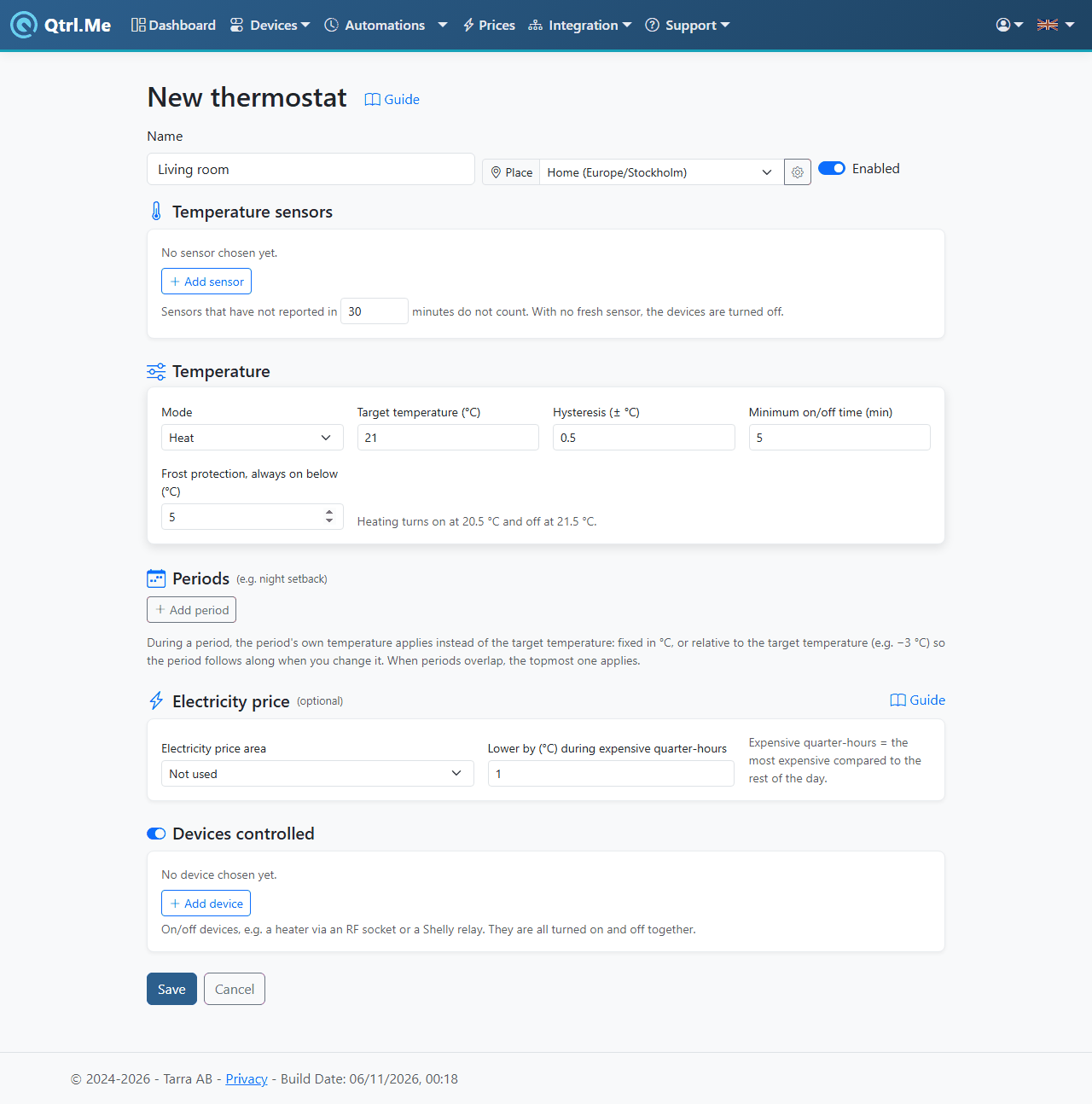
Create a thermostat
- Go to Automations and click New thermostat.
- Give the thermostat a Name, for example Living room, and choose a Place.
- Under Temperature sensors, click Add sensor and choose the sensors that should measure. With several sensors, choose whether the average, lowest value or highest value should be used.
- Under Temperature, set the mode, target temperature and the other values, see below.
- Under Devices controlled, click Add device and choose the heaters or relays. They all turn on and off together.
- Click Save.
The settings under Temperature
- Mode: Heat turns the devices on when it's too cold, Cool when it's too warm. Off turns the devices off once, after which the thermostat leaves them alone until you choose Heat or Cool again.
- Target temperature (°C): the temperature the thermostat aims for, 5–35 °C.
- Hysteresis (± °C): how much the temperature may swing around the target before the thermostat switches. With a target of 21 °C and hysteresis 0.5, heating turns on at 20.5 °C and off at 21.5 °C. The editor always shows the two limits under the field. A larger hysteresis means fewer switches but bigger swings.
- Minimum on/off time (min): the devices can't switch more often than this, to protect heaters and relays. The default is 5 minutes.
- Frost protection, always on below (°C): below this temperature, heating is always on, regardless of periods or electricity price. The default is 5 °C.
Sensors that haven't reported for a while are not counted. The limit is 30 minutes by default and can be changed in the field under Temperature sensors. If no sensor is fresh, the devices are turned off, so that a dead sensor battery doesn't leave the heaters on.
Periods, for example night setback
Under Periods, click Add period to add times when a different temperature than the target applies. A night setback becomes From 22:00, To 06:00, every day, 18 °C. The period's temperature can be Fixed, in °C, or Relative to the target temperature, for example −3 °C, so the period follows along when you change the target. You can have several periods, for example a lower temperature on weekdays while you're at work. If two periods overlap, the topmost one applies.
Electricity price
Under Electricity price (optional) you choose an Electricity price area and how many degrees the thermostat should Lower (for heating) or Raise (for cooling) the target during expensive quarter-hours. Expensive quarter-hours are the most expensive compared to the rest of the day. Frost protection always applies. Price control is included from the Plus level. More about prices is in the guide Controlling by the electricity price.
The thermostat's own device
When you save, qtrl.me creates a virtual device with the same name as the thermostat. It shows the set point, measured temperature, whether heating is on and the mode, and is found under Virtual devices with the label thermostat. Add it to your dashboard to see its status and adjust the set point from there, or use it in a flow. The device is removed when the thermostat is deleted.
Good to know
- The thermostat recalculates its state every minute and as soon as a sensor reports.
- If you disable the thermostat, it stops controlling. Turn off the heaters yourself if they're on.
- Don't control the same heater from both the thermostat and a schedule. The most recent command wins, and they will work against each other.